We offer a 30-day money back guarantee period for all shared hosting plans.
If you are eligible, please open a ticket from the button below or from Help Center -> My Tickets -> Open Support Ticket as an official request for a refund and we will issue the refund within the hour.
As the domain names are non-refundable, we will keep the domain fee and refund the rest in case that you have ordered a domain at a promotional price. All hosting plan renewals are non-refundable.
When you pay by credit card or PayPal, an automatic payment is created for the following year.
The payment processor sends you a notification when this happens and we send reminders at least 24 hours before the automatic charge takes place.
All automatic payments go through exactly 7 days before the date they were created as to avoid any downtime of your websites if there is a problem with the credit card/PayPal account.
The payment processor has no way of knowing the actual expiration date of the service.
We offer Regular SSLs for one domain/subdomain and Wildcard SSLs that cover all subdomains under one domain, both from Sectigo.
They can be ordered for a period between one and two years.
For the time being, we do not offer multi-domain SSLs that can be installed on several domains in the same time, and Extended Validation (EV) SSLs, which show the company name in a green bar in the browser URL bar.
You can request the installation of a “Let’s encrypt” certificate too.
Here is what you need to consider when choosing an SSL certificate:
“Let’s encrypt” certificates – really quick and easy to install. Perfect for non-commercial sites, blogs or photo galleries. Valid for only 90 days and must be renewed before they expire. On our platform, “Let’s encrypt” certificates are renewed automatically, so you won’t have to worry about that.
Regular SSL certificates – include a warranty against misuse or mis-issuance. Suitable for e-stores or enterprise sites, which need warranty-equipped SSL certificate issued by an established CA. Valid for at least one year and can be purchased for more years in advance. Third-party certificates – if you have an SSL certificate purchased from somewhere else, you can upload it to a selected host with a click of the mouse.
You may benefit from using a dedicated IP address for your domain name and hence, for the SSL certificate on it as the IP will open your website and only one SSL will be listed for that IP.
If you do not want to buy a dedicated IP, however, you do not have to, as we offer specially configured shared IP addresses that are used for SSL certificates.
Of course, if you decide to add a dedicated IP address later, you can do so at any time from the Add or Upgrade service(s) link on the left side of your control panel.
Yes, you can buy an SSL certificate from any vendor.
An SSL is issued based on the so-called Certificate Signing Request (CSR), which is a block of code generated on the basis of the contact details you enter for that SSL.
If you have already bought an SSL from another company, you can download/copy the CSR code, the Private Key, which was generated with it, then add them along with the SSL from My Domains -> SSL Certificates.
If you have any issues, you can also contact us by opening a ticket from the Help menu on the top-right of your hosting control panel or from the button below.
If you want to renew one or several domains without renewing your hosting plan, go to MyDomains -> Registered Domains, where you will find a list of all domains registered in your account, tick the checkbox for the ones that you want to renew, then click on the Renew button that is located just above them.
A new page will appear, so you can renew only the selected domains.
The EPP code, which may also be called a domain password or an authorization key/code, is a special code that is required in order to transfer a domain name from one registrar company to another.
You can obtain the EPP transfer authorization key from the company you registered the domain name with.
If you want to transfer a domain name to us, you will be required to enter the code during the order process.
If you are trying to transfer a domain name away from us or you simply want to acquire the EPP transfer authorization key of a domain name that is registered with us, you can do that via the Domain Managersection (My Domains > Registered Domains) of your Control Panel.
Next to each domain name there are three icons – you must click on the EPP icon.
Once you click on the EPP icon you will see a small pop-up window with the following text “From here, you can request the EPP Key for your domain name. This key is needed if you want to transfer your domain name to another registrar.“, click on the button Request EPP.
After you click on that button, the EPP key will be sent via email to the registrant contact email address specified in the WHOIS record of the domain name.
If you do not receive the EPP transfer authorization key within one hour, please make sure that you have provided a correct e-mail address in the WHOIS record.
When attempting to delete a file or folder, you may encounter an error if its permissions do not allow removal. This applies to both individual files and directories.
If you are trying to delete a folder, the issue may not be with the folder itself, but with one or more files or subfolders inside it that have restrictive permissions.
To resolve this issue, you need to update the permissions of the affected file. If the problem involves a folder, you may need to change the permissions for the folder as well as all files and subfolders contained within it.
Set the permissions to 755. Once these permissions are applied to the file or folder (including its contents), you should be able to delete it using the File Manager (Files → File Manager) or via FTP.
With the growing number of websites on the Internet, it is becoming harder and harder to find a suitable domain name to register – one that is short, simple, to the point, and easy to remember.
That’s why, if you come across such a domain name that is suitable for your business or personal website, it is recommended that you register it right away.
Even if your website is not ready yet. You can register unlimited domain names through your account with us and there is no need to host them all. To find more information on hosting a domain name, please refer to the article: How do I host a domain name?
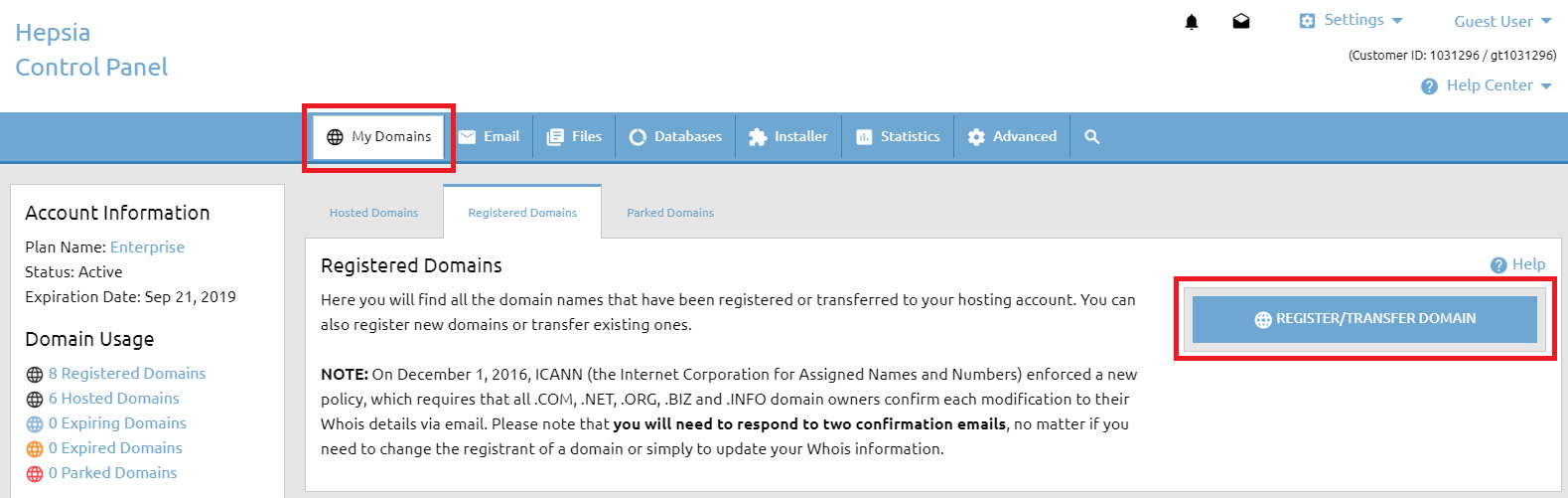
You can easily register a domain name via the Registered Domains section (My Domains > Registered Domains) of the Web Hosting Control Panel. Once you open that menu you should click on the Register/Transfer Domain button on the right-hand side.
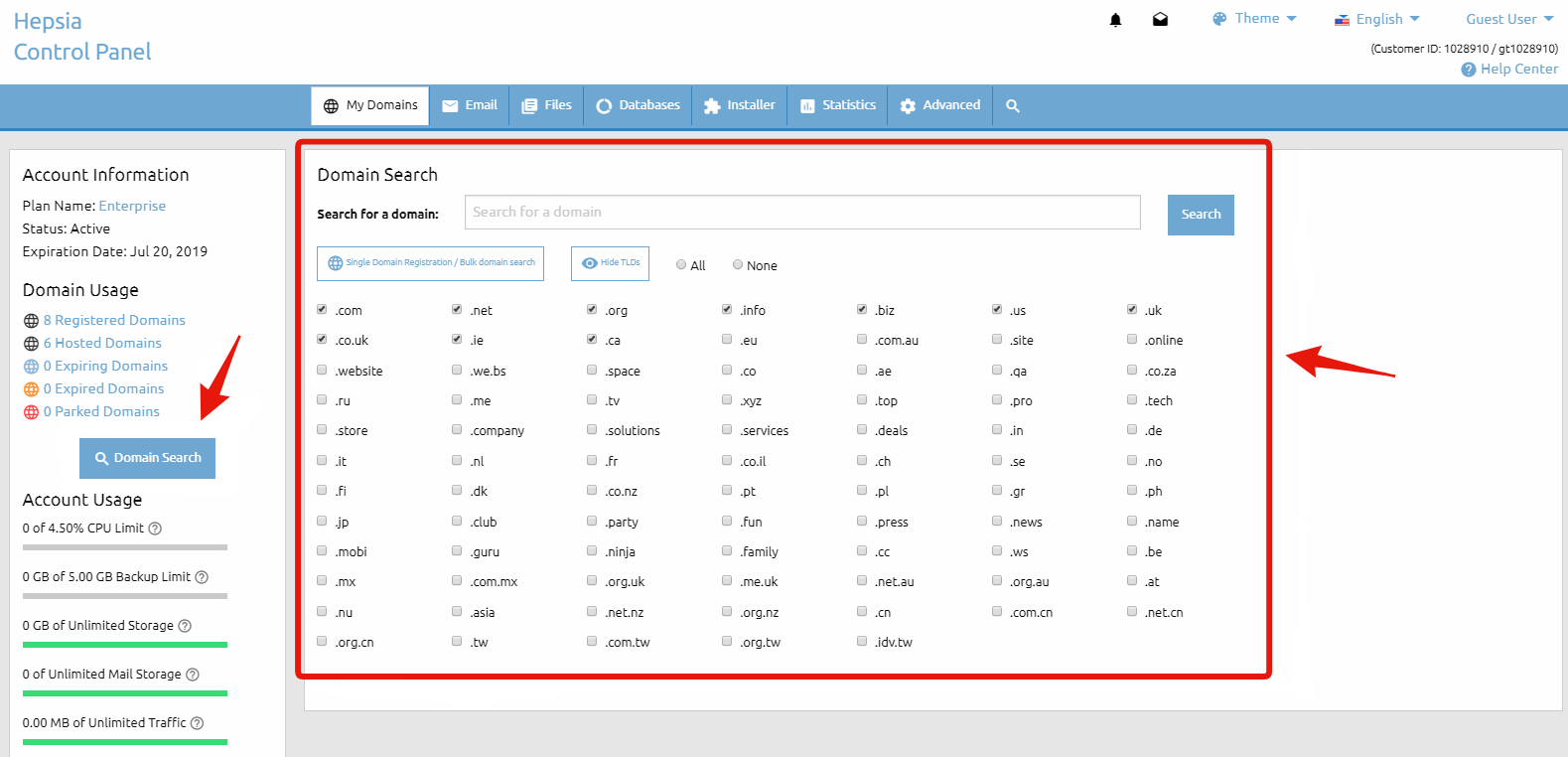
To find our Domain Search form, click on the Domain Search button on the left sidebar of the page. This form will help you find an available domain name for you to register. In the section that is titled Search for a domain: you should input the domain name that you would like to register (what you enter will replace the predefined text my-best-domain.com).
Below that you have a list of all domain types (TLDs) that we can register and you have the option to select and deselect any of them. That way you will be able to choose what domain TLDs to search for.
After that you must click on the Search button. That will execute a search based on the parameters that you have provided and you will be forwarded to the next page Domain Search Results to see the results.
If a domain name is available for registration you will see a Register button next to it. If you are trying to register a domain name, yet only a Transfer option appears, this simply means that someone else already owns the domain name and it is not available for registration.
If you own this domain name you can transfer it to our company by selecting the Transfer button. For more information on transferring a domain name, please refer to the What is a domain transfer? article. If you find the desire domain(s) you have to click on the Proceed with the order button.
On the next page, you also have the option to make a new search if the results from the initial one are not satisfactory. You can keep modifying the search parameters until you find a domain name that you wish to purchase.
There you will find a checkbox named Host this domain name with us. This gives you the option to immediately host the domain name after you submit the payment for the registration. If your current hosting plan does not allow hosting more domain names, you will be provided with the options to purchase an additional hosted domains upgrade or upgrade to a higher package, if one is available.
As soon as you find the domain name that you are looking for and you are ready to proceed with the registration, you must click on the Register button. That will take you to the next step – the contact information for the WHOIS record. Please make sure that you provide accurate contact details. This information will be publicly available.
For some domain TLDs you can purchase an additional service – WHOIS protection (also called ID protection) – that will conceal and protect your contact information. For detailed information about that service, please refer to the What is WHOIS ID protection? article. Once you fill out the registrant section, and if you wish to use the same contact information for all the other sections, there is an option to copy the same information in the other sections as well.
Before proceeding any further, you must agree with the Domain Registration Terms, the Domain Resolution Policy & the eNom Registration Agreement. It is recommended that you familiarize yourself with these documents.
And last, but not least, you need to choose the payment method you would like to use and then click the Continue button on the right to proceed to the payment page, where you will enter your payment information. If none of the listed payment options is suitable for you, please refer to the How to Pay Without a Credit/Debit Card or PayPal article.
The domain”s EPP transfer authorization key must be provided (if the given TLD supports such) – it could be acquired from the domain name’s current registrar (For more information, please refer to: EPP (authorization code))
The transfer verification emails must be responded to – they are sent within 24 hours after the domain transfer is initiated to the Administrative Contact email address specified in the WHOIS record of the domain name
Once the domain transfer is confirmed by following the instructions in the transfer verification email, the transfer procedure becomes fully automated and may take 3-5 business days to complete.
Some specific domain types (TLDs) have different requirements for transferring a domain name. Some TLDs cannot be transferred at all.
However, the afore-mentioned requirements are valid for the majority of the TLDs (domain extensions).